
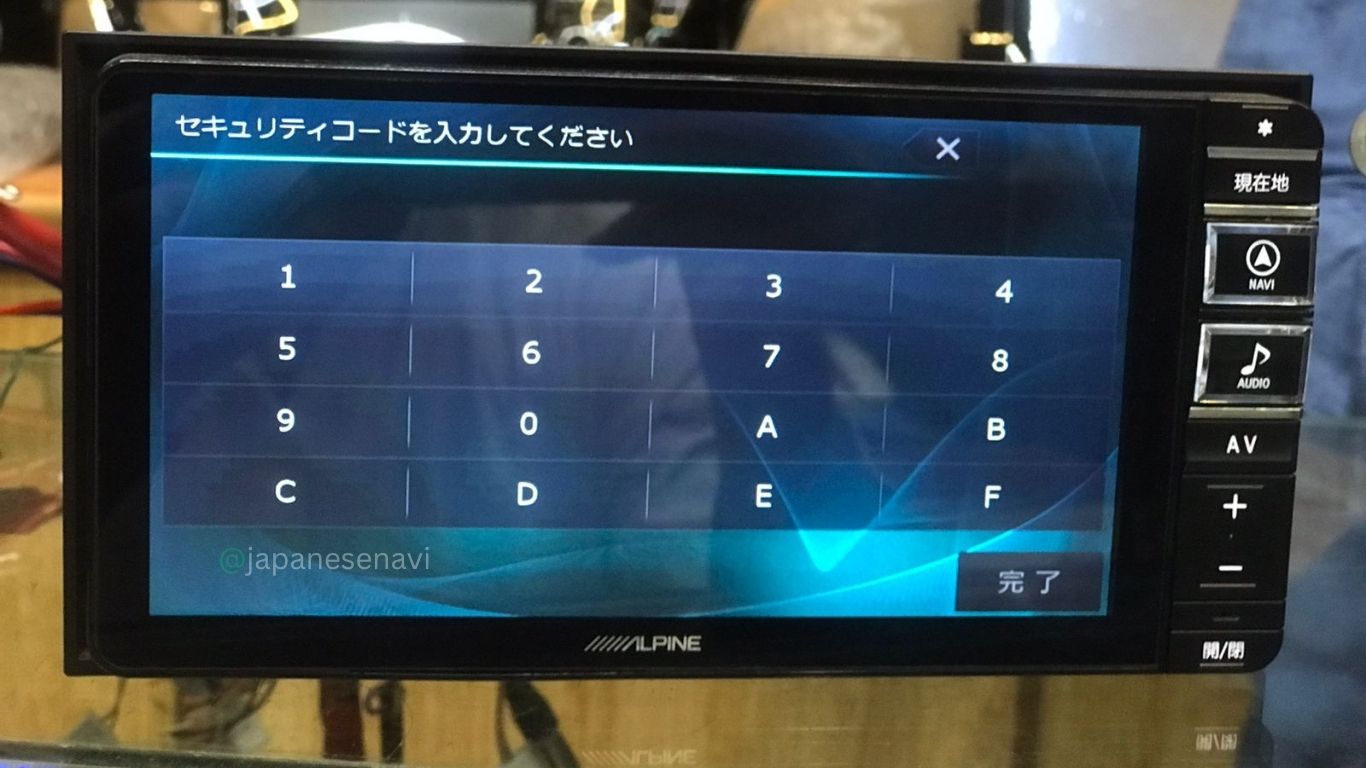
ALPINE VIE-X007WII-B Security Code Unlock Service | Japanese Navi
ALPINE VIE-X007WII-B Security Code Unlock Service for Alpine VIE-X007WII-B Japanese navigation systems.
Designed for customers facing security lock messages, forgotten passwords, protected units, or navigation systems needing code recovery following battery replacement, power loss, reset, or removal from the original vehicle.
Compatible with Alpine VIE-X007WII-B BIG X navigation systems featuring security protection functions.
Customer supplies unit information or security screen details — no physical item is shipped. Global 24/7 remote unlock assistance available.
Description
ALPINE VIE-X007WII-B Security Code Unlock Service
Instant 24/7 remote security code service — Japanese Navi
The ALPINE VIE-X007WII-B Security Code Unlock Service delivers instant remote security code generation for the Alpine VIE-X007WII-B navigation unit. The VIE-X007WII-B is a memory navigation system from the BIG X series with wide display (second generation, B variant), manufactured between 2009–2011, frequently installed as an OEM factory-option navigator for Mazda, Suzuki, and Toyota vehicles. When the security lock activates, the Alpine VIE-X007WII-B unit needs a security code to regain full navigation functionality. This is an instant 24/7 remote service — the Alpine VIE-X007WII-B security code unlock is produced and sent via email right away, often within minutes.
What Is a Security Code for Alpine VIE-X007WII-B?
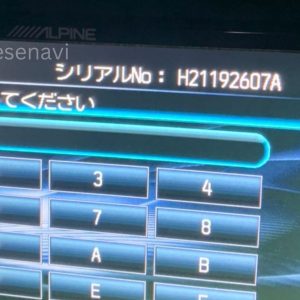
Navigation systems like the Alpine VIE-X007WII-B employ a security lock to block unauthorized map updates and safeguard system information. When your Alpine VIE-X007WII-B encounters a security lock following battery disconnection, factory reset, or several incorrect password entries, the unit locks and shows a security code request. The Alpine VIE-X007WII-B security code is a distinctive alphanumeric combination that brings back normal navigation function instantly.
A security code differs from a PIN or car anti-theft code — it’s unique to the Alpine VIE-X007WII-B’s internal map protection setup. Unlocking your Alpine VIE-X007WII-B with the right security code brings back complete navigation functionality without deleting saved data, route records, or stored destinations.
Compatible Alpine VIE-X007WII-B Models & Service Scope
The ALPINE VIE-X007WII-B Security Code Unlock Service is meant specifically for the Alpine VIE-X007WII-B navigation system.
| Brand | Alpine (Alpine Electronics) |
| Model | VIE-X007WII-B |
| Release | 2009–2011 |
| Navigation Type | OEM Factory-Option Memory Navigation System (BIG X) |
| Display | WXGA Wide Touchscreen |
| Security Lock Type | Map data lock + firmware lock (combination) |
This Alpine VIE-X007WII-B security code unlock service covers security code generation only. It doesn’t include map updates, software installation, or hardware repair. We offer instant 24/7 service for all Alpine VIE-X007WII-B units.
Vehicles Compatible with Alpine VIE-X007WII-B
Mazda Vehicles with Alpine VIE-X007WII-B
- Mazda CX-5 (2009–2011)
- Mazda Atenza / Mazda6 (2009–2011)
- Mazda Axela / Mazda3 (2009–2011)
- Mazda Demio / Mazda2 (2009–2011)
Suzuki Vehicles with Alpine VIE-X007WII-B
- Suzuki Escudo (2009–2011)
- Suzuki Vitara (2009–2011)
- Suzuki Spacia (2009–2011)
- Suzuki Swift (2009–2011)
Toyota Vehicles with Alpine VIE-X007WII-B
- Toyota Aqua (2009–2011)
- Toyota Corolla (2009–2011)
- Toyota Prius (2009–2011)
The Alpine VIE-X007WII-B is an OEM factory-option unit, so compatibility depends on the specific vehicle trim level and factory installation. Our instant 24/7 service supports all compatible vehicles.
Why Security Codes Are Triggered on Alpine VIE-X007WII-B
The Alpine VIE-X007WII-B security lock activates on its own in several typical situations. Battery removal during service or replacement may cause your Alpine VIE-X007WII-B to lock. A factory reset done through the Alpine VIE-X007WII-B system menu also triggers the security lock. Firmware upgrades or software restarts on the Alpine VIE-X007WII-B occasionally need re-entry of the security code. Several unsuccessful password tries will lock your Alpine VIE-X007WII-B as a protective step.
Sometimes, a used Alpine VIE-X007WII-B unit bought without original paperwork will display the security lock too. The lock isn’t an anti-theft feature — it’s a data safeguard that stops accidental or unapproved map updates. Our instant 24/7 service supplies the security code right away.
Common Scenarios for Alpine VIE-X007WII-B Unlock
Owners usually request the ALPINE VIE-X007WII-B Security Code Unlock Service in these situations:
- Battery replacement or disconnect during vehicle maintenance triggering Alpine VIE-X007WII-B lock
- Forgotten password or incorrect password entry on Alpine VIE-X007WII-B
- Factory reset performed through the Alpine VIE-X007WII-B system menu
- Firmware update or software restart triggered a lock on Alpine VIE-X007WII-B
- Second-hand Alpine VIE-X007WII-B unit purchased with security lock active
- Attempting to restore map data or perform a software update on Alpine VIE-X007WII-B
- Alpine VIE-X007WII-B shows “security code required” or “unlock code” prompt on screen
The Alpine VIE-X007WII-B security code unlock brings back full navigation access and lets the Alpine VIE-X007WII-B unit resume normal operation right away.
What the Alpine VIE-X007WII-B Unlock Service Does & Doesn’t
This instant Alpine VIE-X007WII-B security code unlock service DOES:
- Generate the correct Alpine VIE-X007WII-B security code for your unit instantly
- Restore Alpine VIE-X007WII-B map data access and full navigation operation immediately
- Enable Alpine VIE-X007WII-B software updates and firmware installations
- Unlock Alpine VIE-X007WII-B system settings and restore stored locations/routes
- Provide instant follow-up support if the Alpine VIE-X007WII-B security code needs adjustment
- 24/7 availability — service available anytime, day or night
This Alpine VIE-X007WII-B security code unlock service DOES NOT:
- Fix hardware failures on Alpine VIE-X007WII-B (broken display, GPS antenna, power supply, etc.)
- Repair GPS reception or positioning issues on Alpine VIE-X007WII-B
- Replace lost or corrupted map data in Alpine VIE-X007WII-B
- Bypass vehicle anti-theft systems
If your Alpine VIE-X007WII-B has hardware problems or GPS faults unrelated to the security lock, those need separate diagnosis and repair.
What’s Needed for Instant Alpine VIE-X007WII-B Security Code Unlock
To request an instant Alpine VIE-X007WII-B security code unlock, please supply:
- Unit model number: Confirm it is exactly Alpine VIE-X007WII-B
- Unit photo: Clear photo showing the Alpine VIE-X007WII-B model number and serial number
- Current unit state: Does the Alpine VIE-X007WII-B screen show the security code prompt? Does the unit boot?
Once we get this information, your Alpine VIE-X007WII-B security code is produced and sent instantly — typically within minutes, 24/7.
How the Instant Alpine VIE-X007WII-B Security Code Unlock Service Works (24/7)
Step 1: Reach Out — Send your Alpine VIE-X007WII-B model number, unit photo, and short description via WhatsApp or email. Inquiries welcome 24/7, instant reply.
Step 2: Fast Verification — Japanese Navi checks the Alpine VIE-X007WII-B details right away. Verification done within minutes.
Step 3: Instant Alpine VIE-X007WII-B Code Creation — The right Alpine VIE-X007WII-B security code is made for your unit immediately.
Step 4: Quick Email Delivery — The Alpine VIE-X007WII-B security code arrives in your inbox instantly, usually within minutes. The code is tied to your unit’s serial number.
Step 5: Alpine VIE-X007WII-B Unit Input — Type the Alpine VIE-X007WII-B security code at the security code prompt. The Alpine VIE-X007WII-B then unlocks and returns to normal use right away.
Step 6: Instant Backup Support — If the code fails, Japanese Navi gives immediate help, 24/7.
24/7 Instant Availability: WhatsApp messages welcome anytime. Quick replies, instant code delivery. No delays — service runs nonstop.
Frequently Asked Questions
Is the Alpine VIE-X007WII-B security code unlock a physical product?
No. The Alpine VIE-X007WII-B Security Code Unlock Service is entirely remote. The security code is generated and delivered via email instantly. No physical product is shipped.
How long does it take to get the Alpine VIE-X007WII-B security code?
Instant delivery — typically within minutes of receiving your information. Many requests are completed immediately, 24/7.
Is 24/7 support available?
Yes. Inquiries accepted 24/7 via WhatsApp or email. Immediate responses, instant code delivery. Service available anytime, day or night.
What information do you need?
Alpine VIE-X007WII-B model number, photo of the model label and serial number, and description of current unit state. Quick and simple.
Will this fix all navigation problems?
The security code unlock resolves the security lock instantly and restores map access. Hardware problems or GPS issues require separate diagnosis.
Can I get the code immediately?
Yes. Instant code generation and delivery — typically within minutes. No waiting, 24/7 service.
What if the code doesn’t work?
Instant follow-up support is included, 24/7. Japanese Navi will troubleshoot with you immediately to resolve the issue at no extra cost.
Is this service legal?
Yes. The service is provided for authorized users.
Does this remove vehicle anti-theft?
No. This service is for the navigation unit’s security code only. Vehicle anti-theft systems are separate.
Can you help if I forgot my password?
Yes. The security code unlock bypasses a forgotten password instantly and restores access immediately.
I bought it second-hand — can I still get a code?
Yes, with unit information and photos showing the model and serial number. Instant service, 24/7.
Are refunds available?
The service is non-refundable once the code is delivered. However, instant support and rework are provided immediately if the code is faulty.
Before You Request Alpine VIE-X007WII-B Security Code
Before submitting a request, please confirm:
- Your navigation unit is exactly Alpine VIE-X007WII-B
- You know the current state (does it boot? does it show the security prompt?)
- You can provide a clear photo of the model number and serial number
Contact Japanese Navi via WhatsApp for instant service — 24/7 support available, immediate response.
Alpine VIE-X007WII-B Security Code Unlock & 24/7 Instant Support
Japanese Navi offers instant 24/7 remote Alpine VIE-X007WII-B security code creation. The service covers immediate code generation, quick email delivery, and 24/7 backup support.
24/7 Instant Availability: Inquiries welcome anytime through WhatsApp or email. Quick replies, instant code delivery — no delays. Service runs around the clock, day or night.
Instant Turnaround: Codes made and sent within minutes. Many requests finished right away.
Instant Backup Support: If the code needs tweaking or fails, quick help is given at no extra charge, 24/7.
Global Instant Service: Open to customers everywhere, 24/7. No time zone limits.
Japanese Navi provides instant 24/7 service; inquiries accepted anytime, immediate responses. Codes delivered within minutes. Full instant follow-up support included if issues arise.
Reviews
There are no reviews yet.