
Panasonic CN-LR810D Map SD Card for Subaru Legacy Outback & B4 | JapaneseNavi
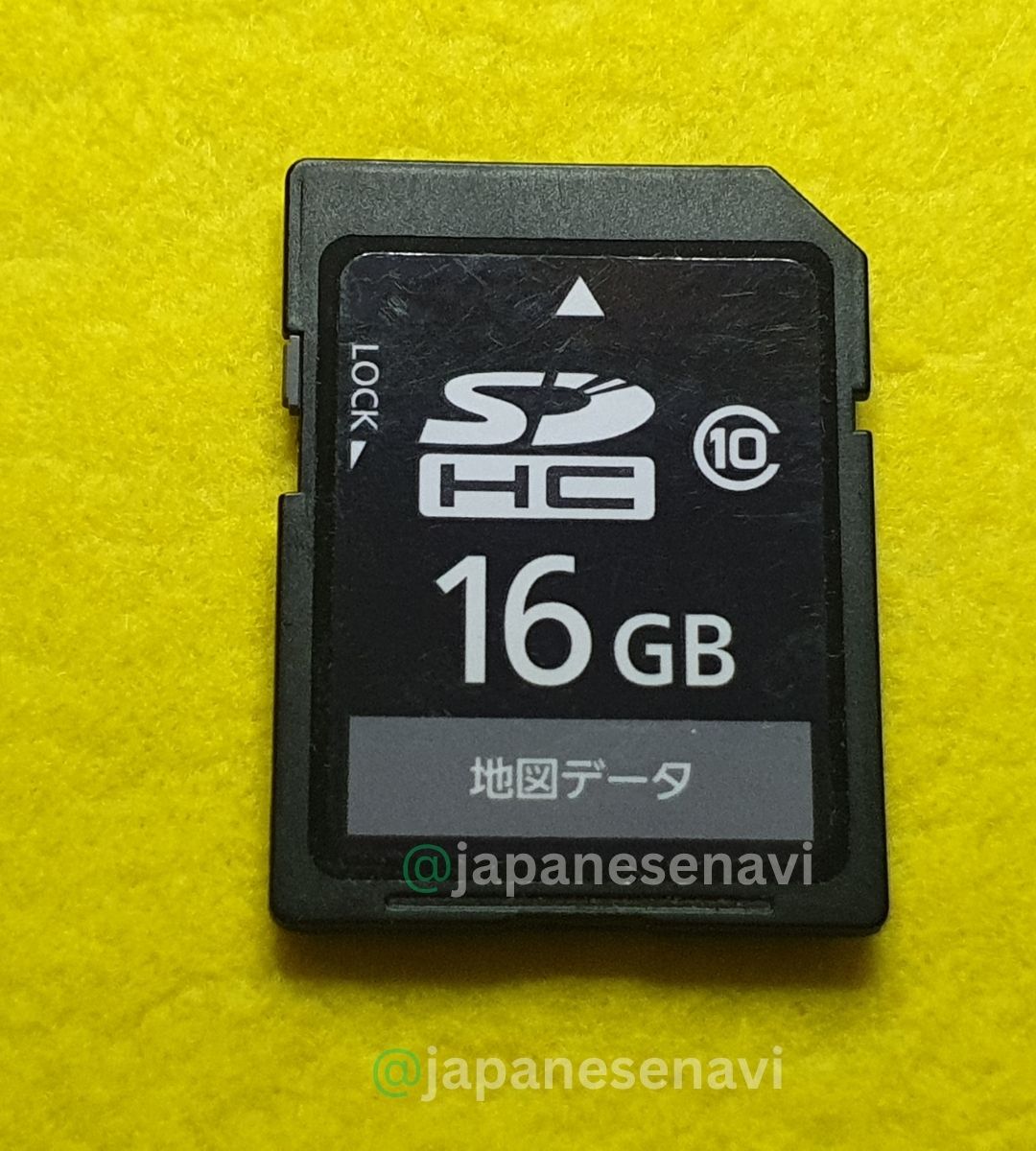
Panasonic CN-LR810D Map SD Card for compatible Japanese Subaru navigation systems. Designed for Subaru Legacy, Legacy Outback and Legacy B4 applications using the CN-LR810D navigation unit. Suitable for customers looking for a replacement map SD card when the original card is missing, damaged, corrupted or unreadable. Please confirm CN-LR810D on your navigation unit before ordering.
Description
Panasonic CN-LR810D Map SD Card for Subaru Legacy, Outback & B4
Japanese Subaru Panasonic Navigation Map SD Card Solution by JapaneseNavi
The Panasonic CN-LR810D Map SD Card is a navigation map SD card solution for compatible Japanese-market Subaru vehicles equipped with the Panasonic CN-LR810D built-in navigation system. The CN-LR810D is a Panasonic 8-inch built-in navigation unit found in Subaru vehicles, including the Subaru Legacy Outback and Subaru Legacy B4.
If the original navigation map SD card is missing, damaged, corrupted, unreadable, or unavailable, the correct replacement map card may help restore access to navigation map data on a compatible CN-LR810D system.
The exact navigation model is extremely important. Subaru vehicles can be equipped with different navigation systems depending on model, grade, year and factory/dealer equipment. Therefore, a map SD card for another Panasonic navigation model should not automatically be considered compatible with the CN-LR810D.
Before ordering: Please check the model number displayed on the navigation unit and confirm that it is CN-LR810D.
Live Support |
YouTube |
Facebook |
TikTok |
Instagram
📌 CN-LR810D Compatibility Information
Navigation Model:
Panasonic CN-LR810D
Manufacturer:
Panasonic
Navigation Type:
Built-in 8-inch SD navigation system
Product Type:
Navigation Map SD Card
Primary Vehicle Manufacturer:
Subaru
Primary Vehicle Applications Found:
Subaru Legacy Outback / Subaru Legacy B4
Japanese vehicle listings and owner discussions identify the CN-LR810D as the Panasonic 8-inch navigation used in Subaru Legacy Outback and Legacy B4 vehicles. Examples include 2015–2016 Subaru vehicles equipped with CN-LR810D.
Important: Compatibility should always be confirmed using the exact navigation model number. A vehicle name alone is not sufficient because the same Subaru model can be equipped with different navigation systems.
🚗 Compatible Subaru Vehicles
The CN-LR810D is associated with the Subaru Legacy family and is particularly documented in vehicles such as the Subaru Legacy Outback and Subaru Legacy B4.
- Subaru Legacy Outback
- Subaru Legacy B4
- Subaru Legacy — confirm exact navigation equipment before ordering
Current and archived Japanese vehicle listings show the CN-LR810D installed in Subaru Legacy Outback vehicles, including 2015 and 2016 examples. Japanese used-vehicle listings also show CN-LR810D installed in Legacy B4 vehicles.
Do not purchase based only on the vehicle name. A Legacy, Outback or B4 can have different navigation equipment depending on the vehicle specification. The safest compatibility check is the model number printed on the navigation unit.
⚠️ Common CN-LR810D Navigation Problems
When the required navigation map SD card is missing, damaged, corrupted, incompatible or cannot be read, a CN-LR810D system may display a map-card or navigation-data warning. Depending on the condition of the system, customers may search for the following problems:
- CN-LR810D map not loading
- CN-LR810D navigation map missing
- CN-LR810D SD card missing
- CN-LR810D map SD card replacement
- CN-LR810D SD card not recognized
- CN-LR810D navigation data error
- CN-LR810D map data cannot be read
- CN-LR810D navigation unable to read map data
- CN-LR810D map card problem
- CN-LR810D navigation stopped working after SD card problem
- Original CN-LR810D map card lost
- Original navigation SD card damaged
A missing or damaged map card is not the only possible cause of a navigation problem. Hardware failure, software problems, power interruption or another fault in the navigation unit can produce similar symptoms. A replacement SD card should therefore not be described as a guaranteed solution to every navigation fault.
🈁 Japanese CN-LR810D Error Messages & Warnings
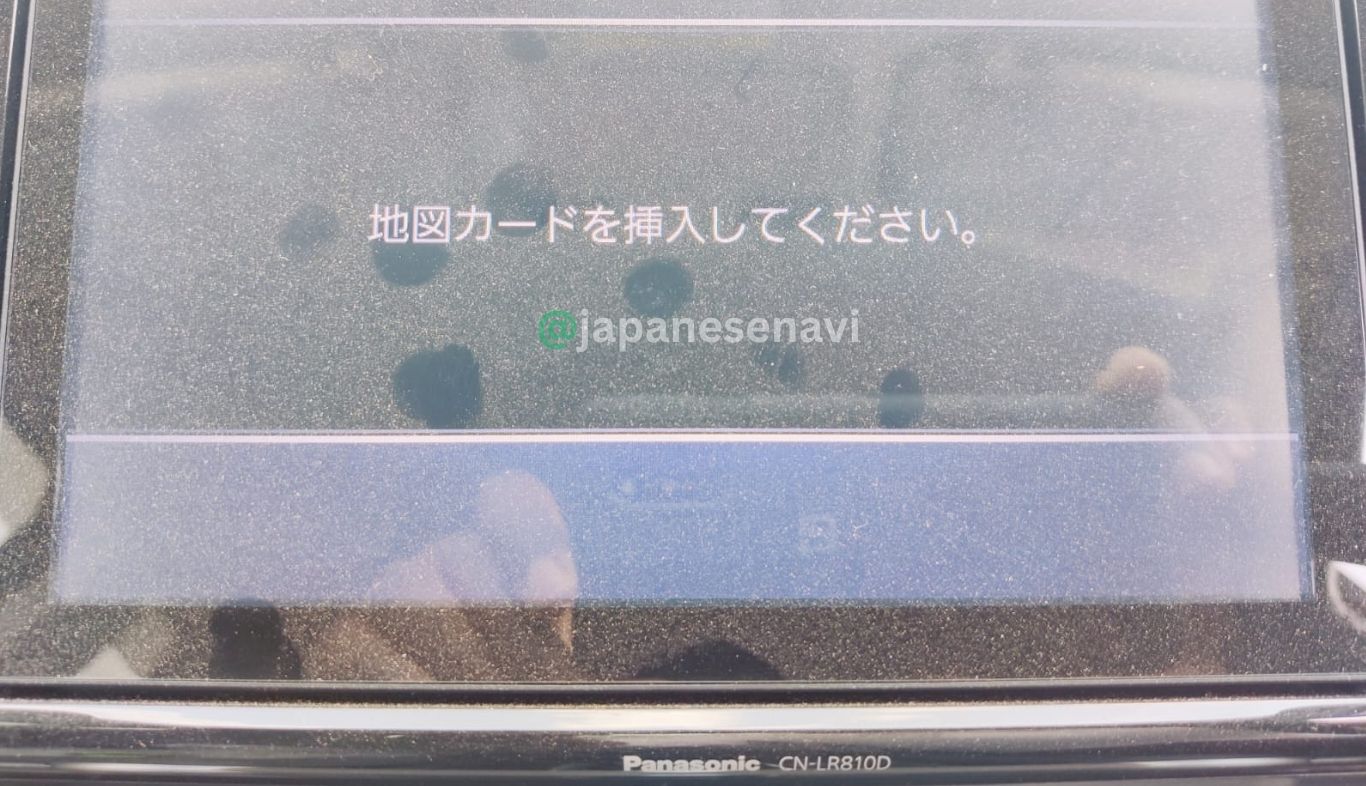
Japanese-market Panasonic navigation systems can display Japanese-language messages when the required map media or navigation data cannot be accessed. Customers searching for CN-LR810D solutions may encounter phrases such as:
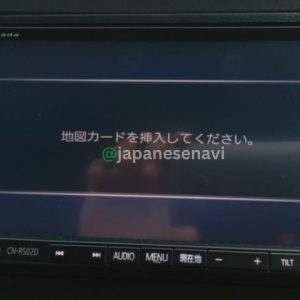
- 地図SDカードを挿入してください — Please insert the map SD card.
- 地図カードがありません。 — Map card is missing / Map card not found.
- ファイルが見つかりません。SDカードをご確認ください。 — File not found. Please check the SD card.
- SDカードを確認してください。 — Please check the SD card.
- プログラムを読み込むことができません。 — The program cannot be loaded.
- 地図ディスクを確認しています。しばらくお待ち下さい。 — Checking the map disc. Please wait.
These phrases are useful search terms for Japanese navigation troubleshooting. The exact message shown by an individual CN-LR810D may vary according to the system software, map version and condition of the SD card.
Important: An error message mentioning an SD card does not automatically prove that the physical SD card is defective. Confirm the card, navigation model and system condition before replacing components.
💾 CN-LR810D Map SD Card Information
The CN-LR810D uses SD-based navigation map data. Panasonic Strada SDHC resources and navigation-data listings specifically identify CN-LR810D as a supported Panasonic navigation model.
Map update availability can depend on the navigation model and the specific map-data generation. Japanese users have also reported that multiple update products exist for CN-LR810D, so it is important to distinguish the exact navigation model and map version rather than purchasing an SD card solely because it is described as a Panasonic navigation card.
Map version warning: Do not assume that every CN-LR810D map SD card contains the latest available map. If the product is supplied with a specific map year or version, that version should be clearly stated on the product page.
JapaneseNavi recommends confirming the exact map version before purchase if you specifically require a particular map-data edition.
🗺️ CN-LR810D Map Update & Replacement
CN-LR810D Map Update
The CN-LR810D has been supported by Panasonic navigation map update media. Japanese users searching for CN-LR810D updates commonly distinguish between different map-update products and SD-card versions.
This is important because a navigation map card is not necessarily interchangeable between every Panasonic Strada model. The exact model number should be matched before purchasing.
Replacing a Missing Map Card
If your original CN-LR810D map SD card is missing, first confirm that the navigation unit itself is CN-LR810D. A replacement should then be selected for the correct navigation model and applicable map-data version.
Replacing a Damaged Card
If the original card is physically damaged or cannot be read, replacing it may restore map-data access if the card was the cause of the problem. If the navigation unit continues to display errors with a known-compatible card, further diagnosis may be required.
Do Not Format the Original Navigation Card
If your original navigation card is still available, do not casually format, erase or modify it. Navigation cards can contain model-specific data and system files that are not equivalent to ordinary removable storage.
🔧 CN-LR810D SD Card Replacement Guide
Step 1 — Check the Navigation Model
Look at the navigation unit, label or documentation and confirm:
CN-LR810D
Step 2 — Check the Existing SD Card
If the original card is still present, check its label and condition. Keep the original card safely stored and avoid modifying it unless the correct procedure for the specific navigation system is known.
Step 3 — Confirm the Map Version
Different map editions can exist for the same navigation model. Confirm the map version supplied with the replacement card before ordering.
Step 4 — Install the Correct Card
Insert the compatible navigation map SD card according to the navigation manufacturer’s instructions. Make sure the vehicle is safely parked before handling the navigation system.
Step 5 — Check Navigation Operation
After installation, allow the navigation system to read the card and check whether map data and navigation functions operate normally.
🔍 CN-LR810D Related Search Keywords
The following terms represent relevant search intent around this exact navigation model:
- CN-LR810D Map SD Card
- CN-LR810D SD Card
- CN-LR810D map card
- CN-LR810D navigation SD card
- Panasonic CN-LR810D
- Panasonic CN-LR810D Map SD Card
- Panasonic CN-LR810D navigation map
- Subaru CN-LR810D SD Card
- Subaru CN-LR810D map card
- Subaru Legacy CN-LR810D
- Subaru Legacy Outback CN-LR810D
- Subaru Legacy B4 CN-LR810D
- Subaru Outback navigation SD card
- Subaru B4 navigation SD card
- CN-LR810D replacement SD card
- CN-LR810D map card replacement
- CN-LR810D navigation map replacement
- CN-LR810D map update
- CN-LR810D SD card missing
- CN-LR810D SD card not recognized
- CN-LR810D map data error
- CN-LR810D navigation error
- CN-LR810D insert map SD card
- CN-LR810D Japanese navigation
- Japanese Subaru navigation SD card
- Japanese Panasonic navigation map card
🚙 Subaru Legacy Outback CN-LR810D
The Subaru Legacy Outback is one of the clearest vehicle associations found for the CN-LR810D. Japanese used-car listings identify the CN-LR810D as the original Panasonic 8-inch SD navigation in Legacy Outback vehicles, including 2015 and 2016 examples.
This makes CN-LR810D + Subaru Outback + Map SD Card an important search-intent combination for customers looking for replacement navigation media.
However, always check the navigation model installed in the individual vehicle. The same vehicle model can be equipped with more than one navigation system depending on specification and year.
🚘 Subaru Legacy B4 CN-LR810D
Japanese used-car listings also document the Subaru Legacy B4 equipped with a Panasonic CN-LR810D navigation system.
Therefore, customers with a Legacy B4 should search and verify the navigation model rather than selecting a map card only by vehicle name.
Correct search combination: Subaru Legacy B4 + Panasonic CN-LR810D + Map SD Card.
⭐ Why Choose JapaneseNavi?
JapaneseNavi specializes in Japanese-market car navigation systems and model-specific navigation map SD cards.
Our approach is based on the exact navigation model number. This is especially important for Japanese imported vehicles because one vehicle model can have different factory and dealer-option navigation systems.
For the CN-LR810D, JapaneseNavi focuses on helping customers identify the correct Panasonic navigation map card for compatible Subaru vehicles.
If you are unsure whether your navigation is CN-LR810D, send JapaneseNavi a clear photograph of the navigation model number before ordering.
❓ Frequently Asked Questions About CN-LR810D
What is the Panasonic CN-LR810D?
The CN-LR810D is a Panasonic built-in 8-inch SD navigation system used in Japanese-market Subaru vehicles.
Which Subaru vehicles use CN-LR810D?
The strongest vehicle associations found for this exact model are the Subaru Legacy Outback and Subaru Legacy B4. Always confirm the navigation model installed in the vehicle.
What is a CN-LR810D Map SD Card?
It is navigation map media intended for a compatible Panasonic CN-LR810D navigation system.
My CN-LR810D says to insert the map SD card. What should I do?
First check whether the correct navigation SD card is installed and whether it can be read. Confirm that your navigation model is CN-LR810D. If the original card is missing or damaged, a compatible replacement may be required.
Can I use another Panasonic CN-series SD card?
Do not assume compatibility between different Panasonic CN-series models. The exact navigation model and map-data version should be matched.
Can a missing SD card stop the navigation system from working?
A missing or unreadable navigation card can prevent the system from accessing required map data. Depending on the system design and fault condition, other navigation functions may also be affected. The exact cause should be diagnosed before assuming that the SD card is the only problem.
Does CN-LR810D use Japanese map data?
The CN-LR810D is a Japanese-market navigation system. Map media should be selected according to the applicable navigation model and map-data version.
Does this card contain the latest map?
The map version depends on the specific card being supplied. A product should not be described as the latest map unless the exact map edition has been verified.
Is CN-LR810D the same as CN-LR820D?
No. CN-LR810D and CN-LR820D are different navigation model numbers. A card for one model should not automatically be assumed to work in the other.
How do I check whether my Subaru has CN-LR810D?
Check the model number printed on the navigation unit, label or related documentation. The required model number for this product is CN-LR810D.
Can I use this SD card in any Subaru?
No. This is not a universal Subaru SD card. Compatibility depends on the installed navigation system. Confirm the exact model number before ordering.
What if I am not sure whether my card is compatible?
Send JapaneseNavi a clear photograph of your navigation model number and, if possible, the original SD card label. This can help confirm the correct product before purchase.
📋 CN-LR810D Product Summary
| Navigation Model | CN-LR810D |
| Manufacturer | Panasonic |
| Navigation Type | Built-in 8-inch SD Navigation |
| Vehicle Manufacturer | Subaru |
| Vehicle Family | Subaru Legacy |
| Confirmed Vehicle Associations | Legacy Outback / Legacy B4 |
| Product Type | Navigation Map SD Card |
| Brand | JapaneseNavi |
Need help confirming your CN-LR810D navigation?
Send JapaneseNavi a clear photograph of the navigation model number before ordering.
Compatibility Disclaimer: Vehicle and navigation compatibility should always be confirmed using the exact navigation model number. Vehicle equipment can vary by model year, grade and factory/dealer option. Map availability and map versions may change over time. JapaneseNavi is an independent navigation SD card supplier and this page is not an official Panasonic or Subaru website.

Reviews
There are no reviews yet.