ECLIPSE

Eclipse Future Link AVN Boot Map SD Card supports a wide range of navigation systems including S, R, D, P, Z, ZX, G, F, V, and C series models covering AVN110 to AVN138 range.

Supported models include: S7, S7W, R7, R7W, RB7, D7, D7W, S8, S8W, R8, R8W, D8, D8W, S9, S9W, R9, R9W, D9, D9W, P10, R10, R10W, D10, D10W, Z01, Z02I, Z03I, Z03IW, Z04I, Z04IW, ZX02i, ZX03i, ZX04i, ZX05i, G01–G05, F01–F02I, V01–V02, C9TD, AVN110–AVN138 series.

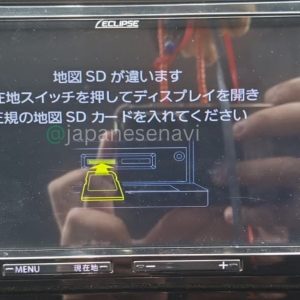
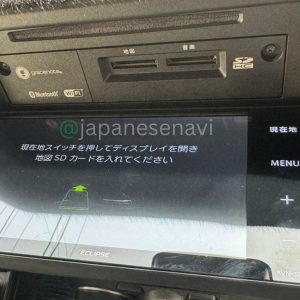
This system is used when the original map SD card is missing, corrupted, or removed due to battery disconnection or memory failure. In such cases, the unit may fail to boot and display system errors, and navigation, Bluetooth, or camera functions may stop working.

We provide boot map SD card and software recovery solutions to restore full system functionality worldwide.

Showing 17–32 of 51 results

  • Eclipse AVN-P10 Map SD Card

    Eclipse AVN-P10 Map SD Card

    The Eclipse AVN-P10 Map SD Card service restores factory navigation on the 2020 model Eclipse AVN-P10 180mm standard 2DIN parking-assist navigation unit. When the original card is lost, corrupted, or missing, navigation stops working entirely. This listing provides remote software download and worldwide WhatsApp support so your Eclipse AVN-P10 navigation runs again without replacing the head unit.

  • ECLIPSE AVN-P10 Map SD Card

    ECLIPSE AVN-P10 Map SD Card | Japanese Navi

    ECLIPSE AVN-P10 Map SD Card software for the Eclipse AVN-P10 (180mm standard DIN) navigation system, also covering the wide-DIN AVN-P10W.
    Designed for customers experiencing missing map data, SD card errors, or navigation-data problems.
    Customer provides their own SD card — no physical card is shipped. Worldwide software download support available.

    Contact us on WhatsApp
    Browse Eclipse Collection

  • Eclipse AVN-R10 Boot Map SD Card

    Eclipse AVN-R10 Boot Map SD Card

    Missing original map SD card may cause camera, Bluetooth, and system functions to stop working.
    This issue can also appear after battery removal, remote reset, or software crash.

    Common on-screen errors include:
    • “現在地スイッチを押してディスプレイを開き地図SDカードを入れてください”
    • “地図SDカードが音楽SDスロットに挿入されています”
    • “Future Link”

    We provide Eclipse AVN-R10 boot software solution via original SD card or download service to restore
    full system functionality worldwide.

    Contact & Support

    📢 WhatsApp / Viber Support
    ☎️ +92 345 3162461

  • Eclipse AVN-R10W Boot Map SD Card

    Eclipse AVN-R10W Boot Map SD Card

    Missing original map SD card may cause camera, Bluetooth, and system functions to stop working.
    This issue can also appear after battery removal, remote reset, or software crash.
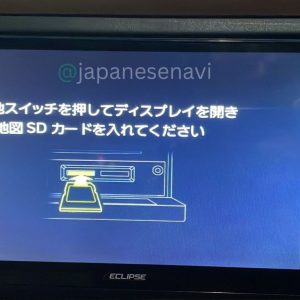
    Common on-screen errors include:
    • “現在地スイッチを押してディスプレイを開き地図SDカードを入れてください”
    • “地図SDカードが音楽SDスロットに挿入されています”
    • “Future Link”

    We provide Eclipse AVN-R10W boot software solution via original SD card or download service to restore
    full system functionality worldwide.

    Contact & Support

    📢 WhatsApp / Viber Support
    ☎️ +92 345 3162461

  • ECLIPSE AVN-R7 Map SD Card

    Eclipse AVN-R7 Map SD Card

    Eclipse AVN-R7 Map SD Card service restores factory navigation on the 2017 model Eclipse AVN-R7 180mm standard 2DIN basic navigation unit. When the original card is lost, corrupted, or missing, navigation stops working entirely. This listing provides remote software download and worldwide WhatsApp support so your Eclipse AVN-R7 navigation runs again without replacing the head unit.

  • ECLIPSE AVN-R7W Map SD Card

    ECLIPSE AVN-R7W Map SD Card | Japanese Navi

    ECLIPSE AVN-R7W Map SD Card software for the Eclipse AVN-R7W (wide-DIN) navigation system, also covering the standard-DIN AVN-R7.
    Designed for customers experiencing missing map data, SD card errors, or navigation-data problems.
    Suitable for the standard (non-drive-recorder) R series model released December 2016.
    Customer provides their own SD card — no physical card is shipped. Worldwide software download support available.

    Contact us on WhatsApp
    Browse Eclipse Collection

  • Eclipse AVN-R8 Map SD Card

    Eclipse AVN-R8 Map SD Card

    The Eclipse AVN-R8 Map SD Card service restores factory navigation on the Eclipse AVN-R8 navigation unit. When the original card is lost, corrupted, or missing, navigation stops working entirely. This listing provides remote software download and worldwide WhatsApp support so your Eclipse AVN-R8 navigation runs again without replacing the head unit.

  • Eclipse AVN-R8W Map SD Card

    Eclipse AVN-R8W Map SD Card

    The Eclipse AVN-R8W Map SD Card service restores factory navigation on the Eclipse AVN-R8W navigation unit. When the original card is lost, corrupted, or missing, navigation stops working entirely. This listing provides remote software download and worldwide WhatsApp support so your Eclipse AVN-R8W navigation runs again without replacing the head unit.

  • Eclipse AVN-R9 Map SD Card

    Eclipse AVN-R9 Map SD Card

    The Eclipse AVN-R9 Map SD Card service restores factory navigation on the Eclipse AVN-R9 navigation unit. When the original card is lost, corrupted, or missing, navigation stops working entirely. This listing provides remote software download and worldwide WhatsApp support so your Eclipse AVN-R9 navigation runs again without replacing the head unit.

  • Placeholder

    Eclipse AVN-R9W Boot Map SD Card

    Missing original map SD card may cause camera, Bluetooth, and system functions to stop working.
    This issue can also appear after battery removal, remote reset, or software crash.
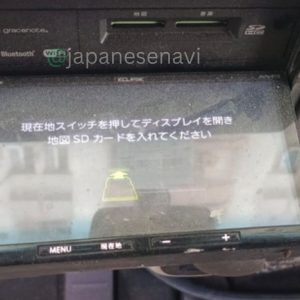
    Common on-screen errors include:
    • “現在地スイッチを押してディスプレイを開き地図SDカードを入れてください”
    • “地図SDカードが音楽SDスロットに挿入されています”
    • “Future Link”

    We provide Eclipse AVN-R9W boot software solution via original SD card or download service to restore
    full system functionality worldwide.

    Contact & Support

    📢 WhatsApp / Viber Support
    ☎️ +92 345 3162461

  • Eclipse AVN-RB7 Boot Map SD Card

    Eclipse AVN-RB7 Boot Map SD Card

    Missing original map SD card may cause camera, Bluetooth, and system functions to stop working.
    This issue can also appear after battery removal, remote reset, or software crash.
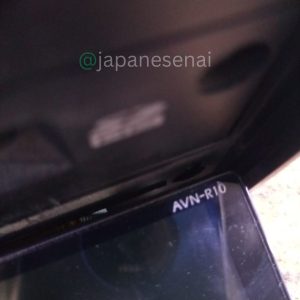
    Common on-screen errors include:
    • “現在地スイッチを押してディスプレイを開き地図SDカードを入れてください”
    • “地図SDカードが音楽SDスロットに挿入されています”
    • “Future Link”

    We provide Eclipse AVN-RB7 boot software solution via original SD card or download service to restore
    full system functionality worldwide.

    Contact & Support

    📢 WhatsApp / Viber Support
    ☎️ +92 345 3162461

  • Placeholder

    Eclipse AVN-S7 Boot Map SD Card

    Missing original map SD card may cause camera, Bluetooth, and system functions to stop working.
    This issue can also appear after battery removal, remote reset, or software crash.
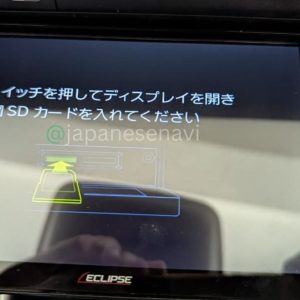
    Common on-screen errors include:
    • “現在地スイッチを押してディスプレイを開き地図SDカードを入れてください”
    • “地図SDカードが音楽SDスロットに挿入されています”
    • “Future Link”

    We provide Eclipse AVN-S7 boot software solution via original SD card or download service to restore
    full system functionality worldwide.

    Contact & Support

    📢 WhatsApp / Viber Support
    ☎️ +92 345 3162461


  • Eclipse AVN-S7W Boot Map SD Card

    Eclipse AVN-S7W Boot Map SD Card

    Missing original map SD card may cause camera, Bluetooth, and system functions to stop working.
    This issue can also appear after battery removal, remote reset, or software crash.
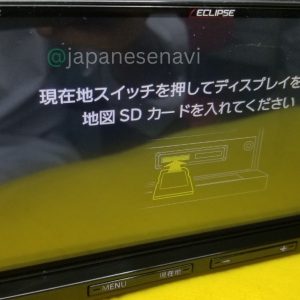
    Common on-screen errors include:
    • “現在地スイッチを押してディスプレイを開き地図SDカードを入れてください”
    • “地図SDカードが音楽SDスロットに挿入されています”
    • “Future Link”

    We provide Eclipse AVN-S7W boot software solution via original SD card or download service to restore
    full system functionality worldwide.

    Contact & Support

    📢 WhatsApp / Viber Support
    ☎️ +92 345 3162461

  • Placeholder

    Eclipse AVN-S8 Boot Map SD Card

    Missing original map SD card may cause camera, Bluetooth, and system functions to stop working.
    This issue can also appear after battery removal, remote reset, or software crash.
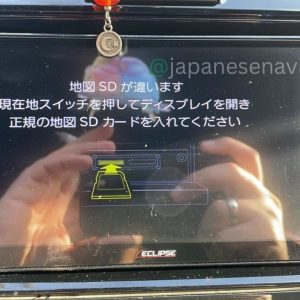
    Common on-screen errors include:
    • “現在地スイッチを押してディスプレイを開き地図SDカードを入れてください”
    • “地図SDカードが音楽SDスロットに挿入されています”
    • “Future Link”

    We provide Eclipse AVN-S8 boot software solution via original SD card or download service to restore
    full system functionality worldwide.

    Contact & Support

    📢 WhatsApp / Viber Support
    ☎️ +92 345 3162461

  • Placeholder

    Eclipse AVN-S8W Boot Map SD Card

    Missing original map SD card may cause camera, Bluetooth, and system functions to stop working.
    This issue can also appear after battery removal, remote reset, or software crash.
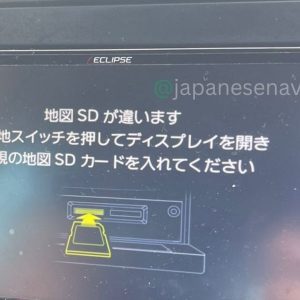
    Common on-screen errors include:
    • “現在地スイッチを押してディスプレイを開き地図SDカードを入れてください”
    • “地図SDカードが音楽SDスロットに挿入されています”
    • “Future Link”

    We provide Eclipse AVN-S8W boot software solution via original SD card or download service to restore
    full system functionality worldwide.

    Contact & Support

    📢 WhatsApp / Viber Support
    ☎️ +92 345 3162461

  • Placeholder

    Eclipse AVN-S9 Boot Map SD Card

    Missing original map SD card may cause camera, Bluetooth, and system functions to stop working.
    This issue can also appear after battery removal, remote reset, or software crash.
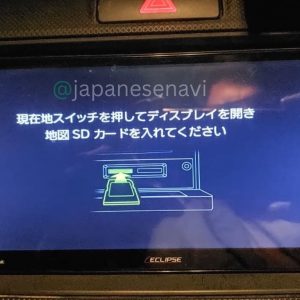
    Common on-screen errors include:
    • “現在地スイッチを押してディスプレイを開き地図SDカードを入れてください”
    • “地図SDカードが音楽SDスロットに挿入されています”
    • “Future Link”

    We provide Eclipse AVN-S9 boot software solution via original SD card or download service to restore
    full system functionality worldwide.

    Contact & Support

    📢 WhatsApp / Viber Support
    ☎️ +92 345 3162461