Shop

Showing 241–256 of 507 results

  • Placeholder

    Eclipse AVN-Z03IW Boot Map SD Card

    Missing original map SD card may cause camera, and system functions to stop working.
    This issue can also appear after battery removal, remote reset, or software crash.

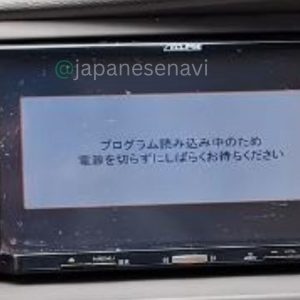
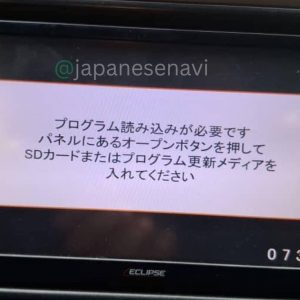
    Common on-screen errors include:

    ・“スイッチを『ピッ』と鳴るまで押してディスプレイを開き地図SDカードを入れて下さい”
    ・“AVスイッチを押してディスプレイを開き地図SDカードを入れてください”
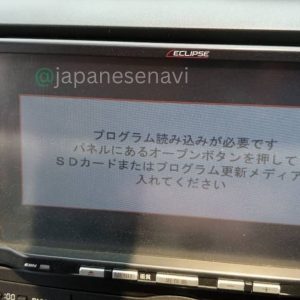
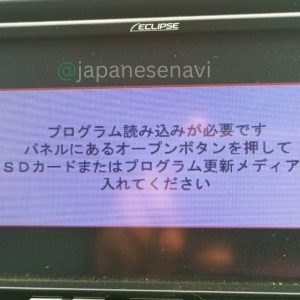
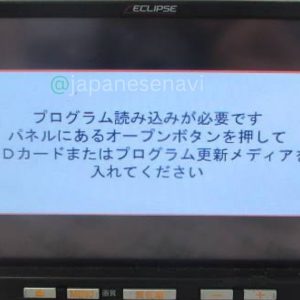
    ・“プログラム読み込みが必要です。パネルのオープンボタンを押してSDカードまたはプログラム更新メディアを入れてください”

    We provide Eclipse AVN-Z03IW boot software solution via original SD card or download service to restore
    full system functionality worldwide.

    Contact & Support

    📢 WhatsApp / Viber Support
    ☎️ +92 345 3162461

  • Placeholder

    Eclipse AVN-ZX02i Boot Map SD Card

    Missing original map SD card may cause camera, and system functions to stop working.
    This issue can also appear after battery removal, remote reset, or software crash.

    Common on-screen errors include:

    ・“スイッチを『ピッ』と鳴るまで押してディスプレイを開き地図SDカードを入れて下さい”
    ・“AVスイッチを押してディスプレイを開き地図SDカードを入れてください”
    ・“プログラム読み込みが必要です。パネルのオープンボタンを押してSDカードまたはプログラム更新メディアを入れてください”

    We provide Eclipse AVN-ZX02i boot software solution via original SD card or download service to restore
    full system functionality worldwide.

    Contact & Support

    📢 WhatsApp / Viber Support
    ☎️ +92 345 3162461

  • Placeholder

    Eclipse AVN-ZX03i Boot Map SD Card

    Missing original map SD card may cause camera, and system functions to stop working.
    This issue can also appear after battery removal, remote reset, or software crash.

    Common on-screen errors include:

    ・“スイッチを『ピッ』と鳴るまで押してディスプレイを開き地図SDカードを入れて下さい”
    ・“AVスイッチを押してディスプレイを開き地図SDカードを入れてください”
    ・“プログラム読み込みが必要です。パネルのオープンボタンを押してSDカードまたはプログラム更新メディアを入れてください”

    We provide Eclipse AVN-ZX03i boot software solution via original SD card or download service to restore
    full system functionality worldwide.

    Contact & Support

    📢 WhatsApp / Viber Support
    ☎️ +92 345 3162461

  • Placeholder

    Eclipse AVN-ZX04i Boot Map SD Card

    Missing original map SD card may cause camera, and system functions to stop working.
    This issue can also appear after battery removal, remote reset, or software crash.

    Common on-screen errors include:

    ・“スイッチを『ピッ』と鳴るまで押してディスプレイを開き地図SDカードを入れて下さい”
    ・“AVスイッチを押してディスプレイを開き地図SDカードを入れてください”
    ・“プログラム読み込みが必要です。パネルのオープンボタンを押してSDカードまたはプログラム更新メディアを入れてください”

    We provide Eclipse AVN-ZX04i boot software solution via original SD card or download service to restore
    full system functionality worldwide.

    Contact & Support

    📢 WhatsApp / Viber Support
    ☎️ +92 345 3162461

  • Placeholder

    Eclipse AVN-ZX05i Boot Map SD Card

    Missing original map SD card may cause camera, and system functions to stop working.
    This issue can also appear after battery removal, remote reset, or software crash.

    Common on-screen errors include:

    ・“スイッチを『ピッ』と鳴るまで押してディスプレイを開き地図SDカードを入れて下さい”
    ・“AVスイッチを押してディスプレイを開き地図SDカードを入れてください”
    ・“プログラム読み込みが必要です。パネルのオープンボタンを押してSDカードまたはプログラム更新メディアを入れてください”

    We provide Eclipse AVN-ZX05i boot software solution via original SD card or download service to restore
    full system functionality worldwide.

    Contact & Support

    📢 WhatsApp / Viber Support
    ☎️ +92 345 3162461

  • ECLIPSE AVN110 Map SD Card

    ECLIPSE AVN110 Map SD Card

    Missing original map SD card may cause camera, and system functions to stop working.
    This issue can also appear after battery removal, remote reset, or software crash.

    Common on-screen errors include:

    ・“スイッチを『ピッ』と鳴るまで押してディスプレイを開き地図SDカードを入れて下さい”
    ・“AVスイッチを押してディスプレイを開き地図SDカードを入れてください”
    ・“プログラム読み込みが必要です。パネルのオープンボタンを押してSDカードまたはプログラム更新メディアを入れてください”

    We provide Eclipse AVN110 boot software solution via original SD card or download service to restore
    full system functionality worldwide.

    Contact & Support

    📢 WhatsApp / Viber Support
    ☎️ +92 345 3162461

  • ECLIPSE AVN1100 Map SD Card

    ECLIPSE AVN1100 Map SD Card

    Missing original map SD card may cause camera, and system functions to stop working.
    This issue can also appear after battery removal, remote reset, or software crash.

    Common on-screen errors include:

    ・“スイッチを『ピッ』と鳴るまで押してディスプレイを開き地図SDカードを入れて下さい”
    ・“AVスイッチを押してディスプレイを開き地図SDカードを入れてください”
    ・“プログラム読み込みが必要です。パネルのオープンボタンを押してSDカードまたはプログラム更新メディアを入れてください”

    We provide Eclipse AVN1100 boot software solution via original SD card or download service to restore
    full system functionality worldwide.

    Contact & Support

    📢 WhatsApp / Viber Support
    ☎️ +92 345 3162461

  • ECLIPSE AVN111 Map SD Card

    ECLIPSE AVN111 Map SD Card

    Missing original map SD card may cause camera, and system functions to stop working.
    This issue can also appear after battery removal, remote reset, or software crash.

    Common on-screen errors include:

    ・“スイッチを『ピッ』と鳴るまで押してディスプレイを開き地図SDカードを入れて下さい”
    ・“AVスイッチを押してディスプレイを開き地図SDカードを入れてください”
    ・“プログラム読み込みが必要です。パネルのオープンボタンを押してSDカードまたはプログラム更新メディアを入れてください”

    We provide Eclipse AVN111 boot software solution via original SD card or download service to restore
    full system functionality worldwide.

    Contact & Support

    📢 WhatsApp / Viber Support
    ☎️ +92 345 3162461

  • ECLIPSE AVN112 Map SD Card

    ECLIPSE AVN112 Map SD Card

    Missing original map SD card may cause camera, and system functions to stop working.
    This issue can also appear after battery removal, remote reset, or software crash.

    Common on-screen errors include:

    ・“スイッチを『ピッ』と鳴るまで押してディスプレイを開き地図SDカードを入れて下さい”
    ・“AVスイッチを押してディスプレイを開き地図SDカードを入れてください”
    ・“プログラム読み込みが必要です。パネルのオープンボタンを押してSDカードまたはプログラム更新メディアを入れてください”

    We provide Eclipse AVN112 boot software solution via original SD card or download service to restore
    full system functionality worldwide.

    Contact & Support

    📢 WhatsApp / Viber Support
    ☎️ +92 345 3162461

  • ECLIPSE AVN113 Map SD Card

    ECLIPSE AVN113 Map SD Card

    Missing original map SD card may cause camera, and system functions to stop working.
    This issue can also appear after battery removal, remote reset, or software crash.

    Common on-screen errors include:

    ・“スイッチを『ピッ』と鳴るまで押してディスプレイを開き地図SDカードを入れて下さい”
    ・“AVスイッチを押してディスプレイを開き地図SDカードを入れてください”
    ・“プログラム読み込みが必要です。パネルのオープンボタンを押してSDカードまたはプログラム更新メディアを入れてください”

    We provide Eclipse AVN113 boot software solution via original SD card or download service to restore
    full system functionality worldwide.

    Contact & Support

    📢 WhatsApp / Viber Support
    ☎️ +92 345 3162461

  • Placeholder

    ECLIPSE AVN114 Map SD Card

    Missing original map SD card may cause camera, and system functions to stop working.
    This issue can also appear after battery removal, remote reset, or software crash.

    Common on-screen errors include:

    ・“スイッチを『ピッ』と鳴るまで押してディスプレイを開き地図SDカードを入れて下さい”
    ・“AVスイッチを押してディスプレイを開き地図SDカードを入れてください”
    ・“プログラム読み込みが必要です。パネルのオープンボタンを押してSDカードまたはプログラム更新メディアを入れてください”

    We provide Eclipse AVN114 boot software solution via original SD card or download service to restore
    full system functionality worldwide.

    Contact & Support

    📢 WhatsApp / Viber Support
    ☎️ +92 345 3162461

  • ECLIPSE AVN133 Map SD Card

    ECLIPSE AVN133 Map SD Card

    Missing original map SD card may cause camera, and system functions to stop working.
    This issue can also appear after battery removal, remote reset, or software crash.

    Common on-screen errors include:

    ・“スイッチを『ピッ』と鳴るまで押してディスプレイを開き地図SDカードを入れて下さい”
    ・“AVスイッチを押してディスプレイを開き地図SDカードを入れてください”
    ・“プログラム読み込みが必要です。パネルのオープンボタンを押してSDカードまたはプログラム更新メディアを入れてください”

    We provide Eclipse AVN133 boot software solution via original SD card or download service to restore
    full system functionality worldwide.

    Contact & Support

    📢 WhatsApp / Viber Support
    ☎️ +92 345 3162461

  • Placeholder

    ECLIPSE C9TD Map SD Card

    Missing original map SD card may cause camera, and system functions to stop working.
    This issue can also appear after battery removal, remote reset, or software crash.

    Common on-screen errors include:

    ・“スイッチを『ピッ』と鳴るまで押してディスプレイを開き地図SDカードを入れて下さい”
    ・“AVスイッチを押してディスプレイを開き地図SDカードを入れてください”
    ・“プログラム読み込みが必要です。パネルのオープンボタンを押してSDカードまたはプログラム更新メディアを入れてください”

    We provide Eclipse C9TD boot software solution via original SD card or download service to restore
    full system functionality worldwide.

    Contact & Support

    📢 WhatsApp / Viber Support
    ☎️ +92 345 3162461

  • Honda CR-V VRU-215CVi radio code unlock

    Honda CR-V VRU-215CVi Unlock

    ⭐⭐⭐⭐☆ 4.5/5 Customer Rating
    ✔ Verified solution for Honda Gathers Navigation & Audio Systems
    ⚡ 3–7 people are viewing this product right now


    ⚡ Instant Code Support Available
    We help you recover your Honda Gathers radio security code when your system is locked after battery removal or reset.


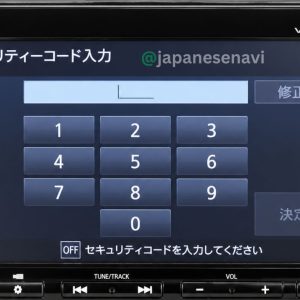
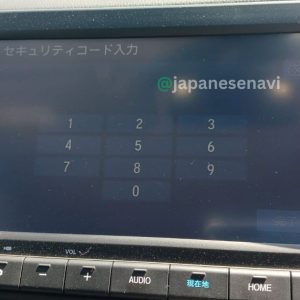
    Security / Password Errors

    • パスワードを入力してください。 – Please enter password
    • セキュリティーコード入力 – Enter security code
    • OFF セキュリティコードを入力してください – Enter security code (OFF mode)

    Supported Model

    • Honda VRU 215CVi Radio Code Unlock Service


    Contact on WhatsApp

  • Honda Gathers LXM 232VFEi Security Code Unlock

    Honda Gathers LXM 232VFEi Security Code Unlock | Japanese Navi

    Honda Gathers LXM 232VFEi Security Code Unlock for Honda radio systems.

    Designed for customers whose radio shows “CODE”, “SECURITY”, or “ENTER CODE” after battery disconnection, unit removal, or power loss.

    Compatible with Honda vehicles equipped with genuine Honda Gather’s LXM 232VFEi radio units requiring security code entry.

    We provide the original security code; you enter it into your unit. Digital service with global 24/7 remote support available.

    Contact us on WhatsApp (24/7)
    Browse Our Honda Collection

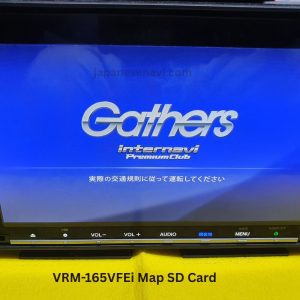
  • Honda Gathers VRM-165VFEi Map SD Card Navigation Unlock

    Honda Gathers VRM-165VFEi Map SD Card

    Honda Gathers VRM-165VFEi Map SD Card solution for Japanese Honda factory navigation systems. Restores navigation operation when the original SD card is missing, damaged, corrupted, or unreadable. Includes download options, fast delivery, and after-sale support.