
CN-RZ83 Map SD Card | Panasonic Suzuki Navigation
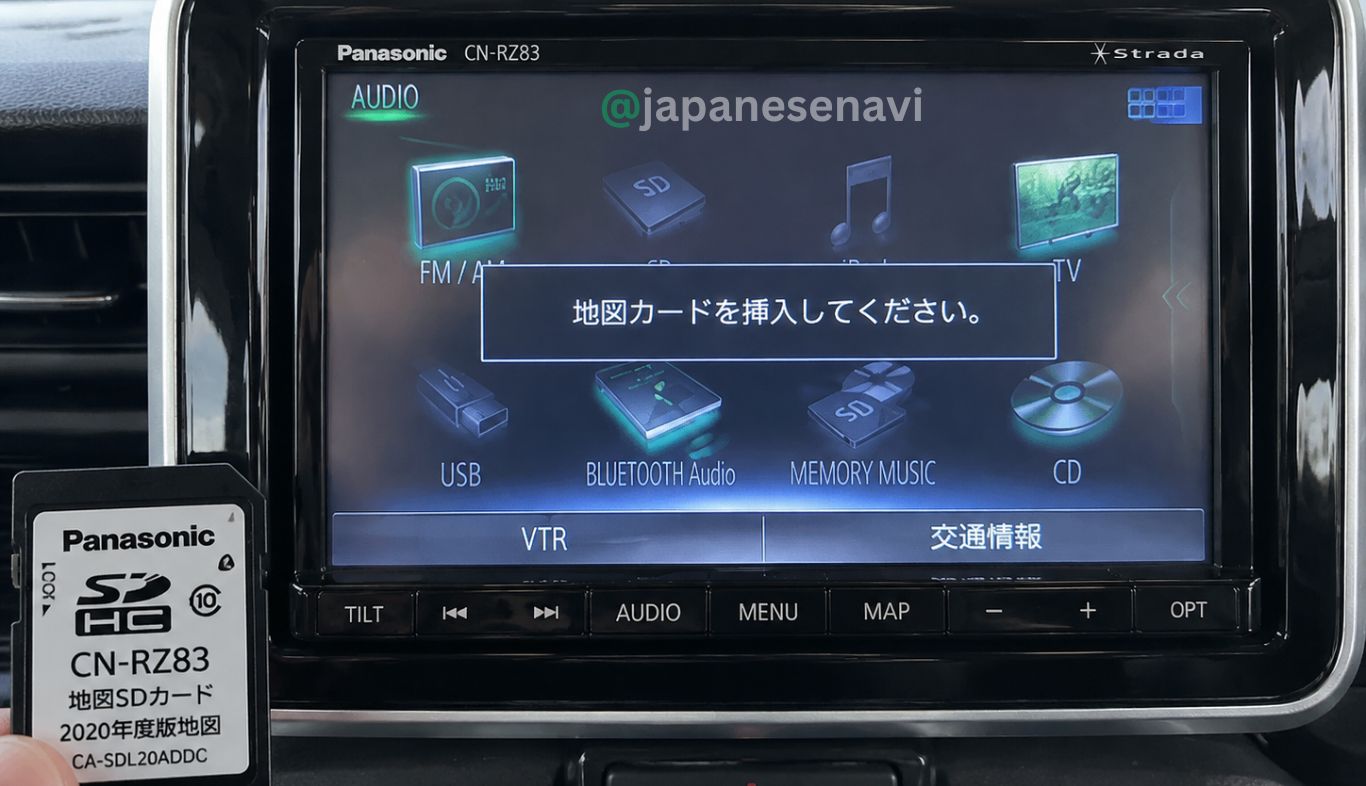
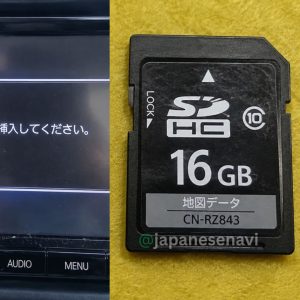
CN-RZ83 Map SD Card for Panasonic Suzuki navigation. Designed for CN-RZ83ZA / 99000-79BD0 systems. Verify your exact navigation model before ordering.
✔ Verified solution for Panasonic CN-series navigation systems
⚡ 3–7 people are viewing this product right now
The CN-RZ83ZA navigation system may stop working when the Map SD card is missing, corrupted, or not detected, causing navigation errors and system failure.
This bootable SD card restores original system functionality.
Common On-Screen Errors
- 地図カードを挿入してください。 – Please insert map card
- 地図カードがありません。 – Map card not found
- SD Card Not Recognized
- Map Data Missing
- Navigation Not Starting
- System restart or boot loop
- Diagnostic / locked menu screen

Description
CN-RZ83 Map SD Card – Panasonic Suzuki Navigation
CN-RZ83ZA / 99000-79BD0 Map SD Card & Navigation Recovery Solution
The CN-RZ83 Map SD Card is intended for Panasonic/Suzuki genuine navigation systems identified as
CN-RZ83ZA. Panasonic identifies CN-RZ83ZA with Suzuki part number 99000-79BD0 as a
2017 model. This exact navigation model number should be checked before purchasing a replacement
map SD card.
A navigation system can depend on its map SD card for map data and navigation functions. If the original card is
missing, damaged, corrupted, unreadable, or no longer being recognized, the navigation system may display map-card
or SD-card related errors. A replacement CN-RZ83 Map SD Card can therefore be relevant when restoring
navigation operation, subject to exact card and system compatibility.
📌 Compatibility Information
Panasonic / Suzuki Navigation Model
| Navigation Model | Manufacturer | Suzuki Part Number | Model Year |
|---|---|---|---|
| CN-RZ83ZA | Panasonic | 99000-79BD0 | 2017 |
The exact model number is more important than the vehicle name. CN-RZ83ZA belongs to Suzuki’s genuine navigation
system lineup, so customers should compare the label or system-information screen on the installed navigation unit
before ordering.
🚗 Vehicle Compatibility & Installation Examples
The CN-RZ83ZA navigation system was used with Suzuki vehicles. Official Suzuki documentation identifies the
CN-RZ83ZA as a Suzuki genuine navigation model. A real-world vehicle record also documents a CN-RZ83ZA removed from
a Suzuki Spacia Hybrid MK53S.
| Vehicle | Evidence / Note |
|---|---|
| Suzuki Spacia Hybrid MK53S | Real-world CN-RZ83ZA installation example |
Important: This vehicle example does not mean every Spacia or every Suzuki vehicle uses the same
navigation system. Suzuki offered multiple navigation models. Always match CN-RZ83ZA / 99000-79BD0
before ordering.
💾 Map SD Card & Navigation Recovery
The original CN-RZ83ZA system uses map data stored on a navigation SD card. Suzuki/Panasonic documentation confirms
that the CN-RZ83ZA was supplied as a genuine Suzuki navigation system and Panasonic’s historical map-update information
specifically lists 99000-79BD0 (CN-RZ83ZA) for SD-based map updates.
If the original map SD card has been lost or is no longer readable, the navigation may fail to load map information.
A replacement card should be matched to the exact navigation model rather than selected only by vehicle name.
Search terms such as CN-RZ83 map SD card, CN-RZ83ZA SD card,
99000-79BD0 map card, and Panasonic Suzuki navigation SD card can help identify
the correct navigation-card requirement.
⚠️ Common CN-RZ83 Navigation / SD Card Problems
- Navigation map does not load.
- Map SD card is missing.
- Navigation cannot recognize the SD card.
- Map data cannot be read.
- Navigation starts but map information is unavailable.
- Original map SD card is damaged or corrupted.
- Navigation displays an SD/map-card related error.
- Replacement SD card does not match the navigation model.
If a navigation system shows an SD-card or map-card error, first confirm that the card belongs to the exact
navigation model. Different Panasonic/Suzuki navigation units can use different map-card data.
🇯🇵 Japanese Navigation Error Messages & Search Terms
Common Japanese navigation/SD-card troubleshooting phrases include:
- 地図カードを挿入してください。 — Please insert the map card.
- 地図カードがありません。 — Map card not found / Map card is missing.
- ファイルが見つかりません。SDカードをご確認ください。 — File not found. Please check the SD card.
- 地図SDHCメモリーカードをご確認ください — Please check the map SDHC memory card.
- ドライブレコーダーにSDカードが挿入されていません — SD card is not inserted in the drive recorder.
- ダイアグ検査メニュー — Diagnostic inspection menu.
The exact wording displayed by a vehicle can vary according to the navigation model, software version and fault
condition. These phrases are useful search and troubleshooting terms and should not be treated as guaranteed
CN-RZ83ZA-specific screen messages.
🔧 CN-RZ83 Map SD Card Troubleshooting
- Confirm that the navigation unit is actually CN-RZ83ZA.
- Check the Suzuki/Panasonic model or part-number label if available.
- Confirm the replacement card is intended for the exact navigation model.
- Insert the card correctly with the navigation system switched off when required by the system instructions.
- Restart the navigation system and allow it time to recognize the map data.
- If the navigation still cannot recognize the card, check whether the card data and navigation system are correctly matched.
Do not assume that a physically identical SD card from another Panasonic navigation model will work in the CN-RZ83ZA.
Navigation map cards can contain model-specific data and protection.
🔎 How to Identify CN-RZ83ZA
Before ordering, look for one of these identifiers:
- CN-RZ83ZA
- 99000-79BD0
- Panasonic genuine Suzuki navigation
The model number may appear on the navigation unit, documentation, label, or system information. Do not confuse
CN-RZ83ZA with similar Panasonic/Suzuki models such as CN-RZ73ZA, CN-RZ82ZA, CN-RZ72ZA,
CN-RZ843ZA or CN-RZ846ZA.
❓ Frequently Asked Questions
Is CN-RZ83 the same as CN-RZ83ZA?
The Suzuki/Panasonic navigation reference is CN-RZ83ZA. For ordering purposes, verify the complete
model number rather than relying only on the shorter CN-RZ83 designation.
What is the Suzuki part number for CN-RZ83ZA?
Panasonic documentation identifies 99000-79BD0 with CN-RZ83ZA.
What year is CN-RZ83ZA?
Panasonic identifies CN-RZ83ZA / 99000-79BD0 in its 2017 model group.
Can I use a CN-RZ73ZA card in CN-RZ83ZA?
Do not assume compatibility. CN-RZ73ZA and CN-RZ83ZA are different navigation models and should be treated as
separate map-card applications.
Can I order by vehicle name only?
It is strongly recommended to order by the exact navigation model number. The same Suzuki vehicle family can have
different factory or dealer-option navigation systems.
🛒 Before Ordering
- Check that your navigation model is CN-RZ83ZA.
- Check for Suzuki part number 99000-79BD0 where available.
- Do not order based only on the vehicle name.
- Do not confuse CN-RZ83ZA with CN-RZ73ZA or other similar Panasonic models.
- If possible, compare the original map SD card label with the replacement-card specification.
- For uncertain cases, provide the navigation model/part-number label before purchasing.
🇯🇵 JapaneseNavi – Japanese Navigation Map SD Card Solution
JapaneseNavi provides Japanese navigation map SD card solutions for customers dealing with missing,
damaged, unreadable or non-recognized navigation map cards.
For the CN-RZ83 Map SD Card, the key identification is
Panasonic CN-RZ83ZA / Suzuki 99000-79BD0. Correct model identification helps avoid ordering the
wrong SD card for a similar-looking Panasonic navigation system.
JapaneseNavi – Japanese Car Navigation Map SD Card & Navigation Recovery Solutions
Reviews
There are no reviews yet.